Set up webhooks
Assistant webhooks notify your server, for instance an EHR, as users of your organization work in Nabla Assistant, for example when a note is generated. The webhook reference lists every event type, when it is sent, and its payload.
Expose an endpoint
Provide a public HTTPS endpoint that accepts POST requests. Respond with any 2xx status once you have verified and processed the event.
For testing, you can use a tool such as Ngrok or Postman to expose a mock server.
Create the webhook
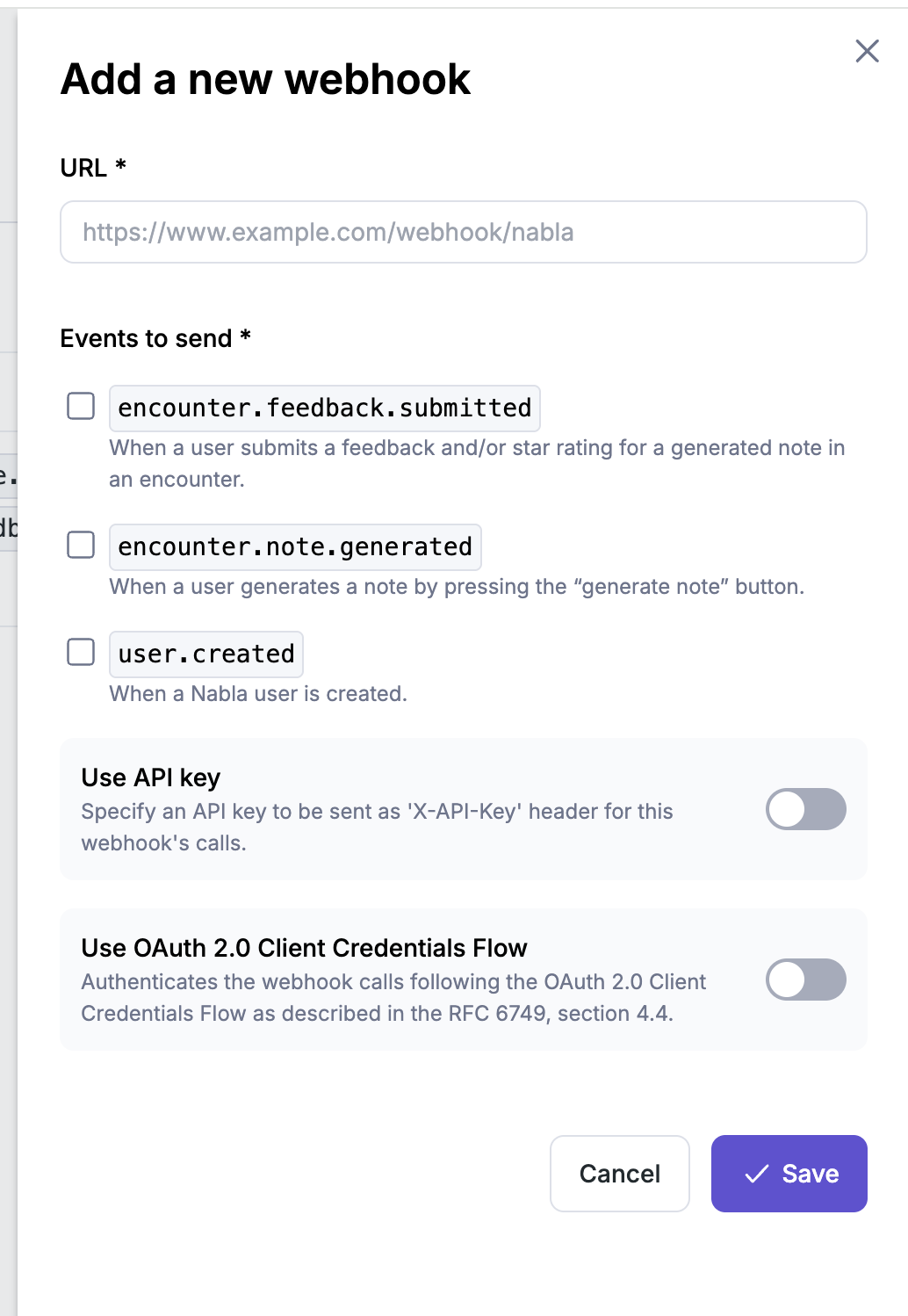
Ask Nabla for access to the Admin page, then add your endpoint in Webhooks and pick the events it should receive. Once the webhook is created, the page shows its signature secret.
Handle events
Each webhook only receives the event types selected for it. Nabla may add fields to existing events, so parse the fields you know and ignore the others.
Delivery and retries
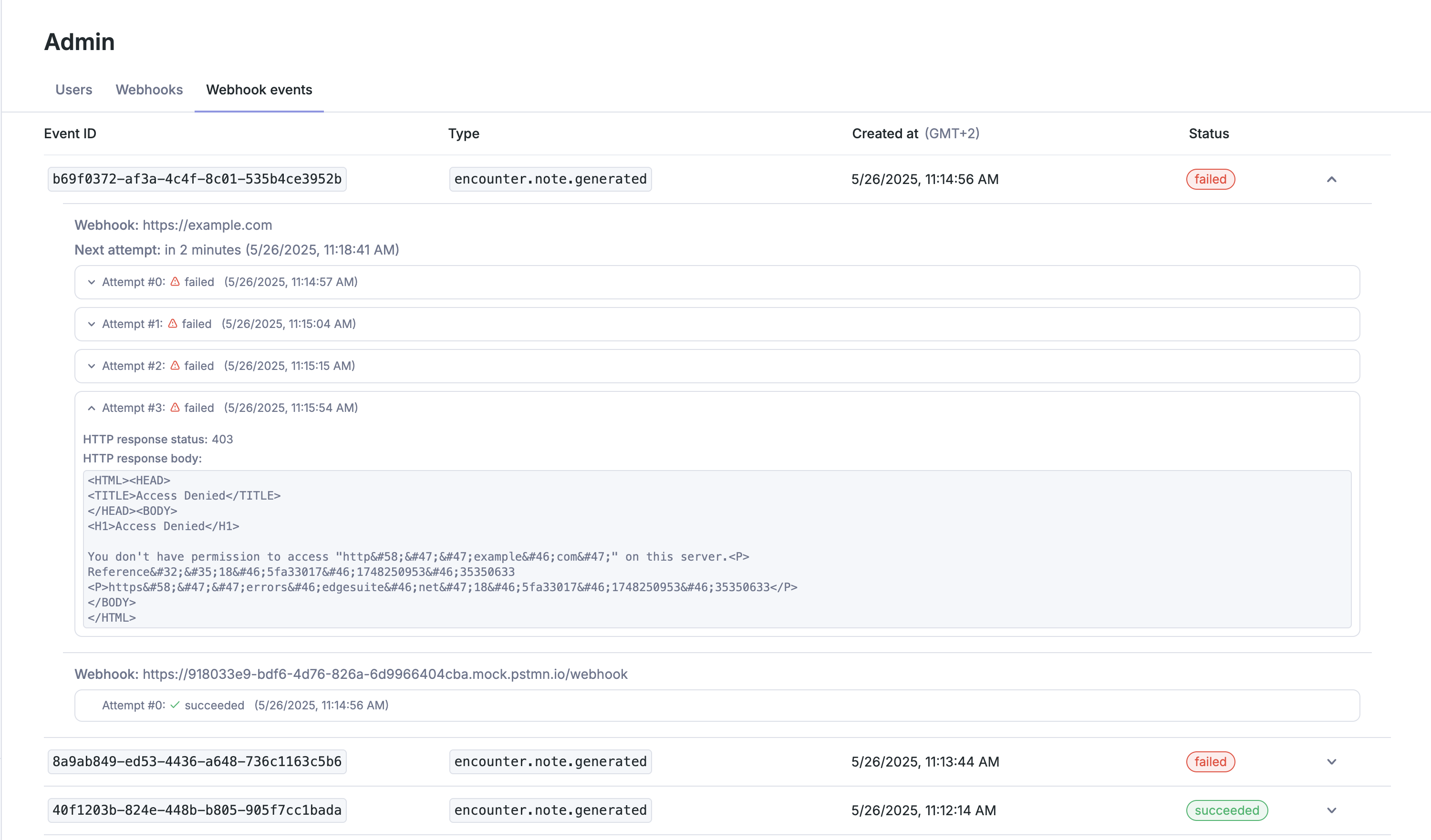
Nabla considers an attempt failed if your endpoint does not respond with a 2xx status within 10 seconds. Failed attempts are retried with an exponential backoff, for a total of 11 attempts over 4 days: 6 attempts in the first ~4.5 hours, starting 10 seconds after the first failure, then one every 18 hours.
Each attempt carries a new attempt_id, while the event's id, created_at and type stay the same. Use id to skip events you have already processed.
A webhook with no successful delivery over the last 7 days and at least 20 failed attempts is disabled automatically, and Nabla notifies your organization by email. Re-enable it from Webhooks once your endpoint is fixed.
Authenticate requests
Your endpoint is public, so only accept requests that genuinely come from Nabla. Nabla supports four methods. A single one is usually enough, and they can be combined. We recommend HMAC signature verification.
HMAC signature (recommended)
Every request includes:
x-nabla-webhook-timestamp: ISO 8601 timestamp of when the request was generated.x-nabla-webhook-signature: one or more comma-separated HMAC-SHA256 signatures of the request.
Each signature is computed from the webhook's signature secret, the timestamp header and the raw request body. On each request:
- Extract the timestamp and signature headers.
- Reject the request if the timestamp is older than 60 seconds (replay protection).
- Concatenate the timestamp and the raw request body.
- Compute the HMAC-SHA256 of that string with the signature secret.
- Compare your digest with each signature in the header.
- Reject with HTTP 401 if none match.
- Skip the event if you have already processed its
id(idempotency).
const bodyParser = require("body-parser");
const crypto = require("crypto");
const express = require("express");

const app = express();

app.use(
  bodyParser.json({
    type: "application/json",
    verify: function (req, res, buf) {
      const webhookSecretKey = "<SIGNATURE_SECRET>";
      const timestamp = req.headers["x-nabla-webhook-timestamp"];
      const receivedSignatures = req.headers["x-nabla-webhook-signature"];

      const computedSignature = crypto
        .createHmac("sha256", webhookSecretKey)
        .update(timestamp + buf)
        .digest("hex");

      const signatureMatch = receivedSignatures
        .split(",")
        .some((sig) => sig.trim() === computedSignature);

      if (!signatureMatch) {
        const error = new Error("Signature invalid");
        error.status = 401;
        throw error;
      }
    },
  }),
);
See RFC 2104 and RFC 4231 for details on HMAC-SHA256.
Rotate the signature secret
Rotate the signature secret regularly from Webhooks. Rotating generates a new secret. Nabla keeps signing with the previous secrets for a short period, so requests carry one signature per active secret while you deploy the new one. Make sure your server accepts any of the signatures in the header. If a secret may be compromised, you can delete the old secrets right away.
OAuth 2.0 client credentials
Nabla can send a bearer access token in the Authorization header of each request, obtained from your authorization server with the OAuth 2.0 client credentials grant. Nabla caches and reuses access tokens: it does not request a new token for every call.
| Field | Description |
|---|---|
| Authorization server endpoint | URL where Nabla requests access tokens |
| Authentication method | How credentials are sent (see below) |
| Client ID | Sent as client_id |
| Client secret | Sent as client_secret |
-
Form URL-encoded (
application/x-www-form-urlencoded): the default, matching RFC 6749 §4.4.2.POST /oauth/tokenContent-Type: application/x-www-form-urlencodedgrant_type=client_credentials&client_id=xxx&client_secret=yyy -
JSON body (
application/json):{"grant_type": "client_credentials","client_id": "xxx","client_secret": "yyy"}
API key
Configure an API key on the webhook, and Nabla sends it in the X-API-Key header of each request. Respond with 401 if the header is missing or does not match. Keep the key confidential and rotate it regularly.
Mutual TLS
If your endpoint requires client certificate authentication, Nabla presents a TLS client certificate during the handshake. To validate it against a trusted authority, contact Nabla support to get our root certificate.
Debug deliveries
Webhook events in the Admin page lists recent events with each delivery attempt, its response status code and, for failures, the response body. Use it to troubleshoot your integration, for instance failed authentication.